United Airlines
- 4.7
- Rating
- 10.00M
- Installs
- Free
- Price

 Analysis by App-foxy
I tested United Airlines as a practical travel companion rather than treating it as just another airline download. Developed by United Airlines, this free Travel & Local app is designed to keep flight information close at hand, and that matters most when a trip becomes busy: moving through an unfamiliar airport, checking a change while carrying luggage, or trying to understand what happens next without opening a laptop. My overall impression is that it works best when you are already flying with United and want one place for the details that normally get scattered across emails, airport screens, and paper notes.
The app has been available since August 23, 2011, and its current version is 4.2.60. It is rated for Everyone, works on operating systems from version 10 onward, and has grown to more than 10 million installs. Those figures suggest that it is not a niche utility used only by frequent flyers. Still, popularity should not be confused with universal convenience. The real question is whether its design remains understandable when your attention, vision, hearing, dexterity, or internet access is under pressure.
How clearly the app presents a trip
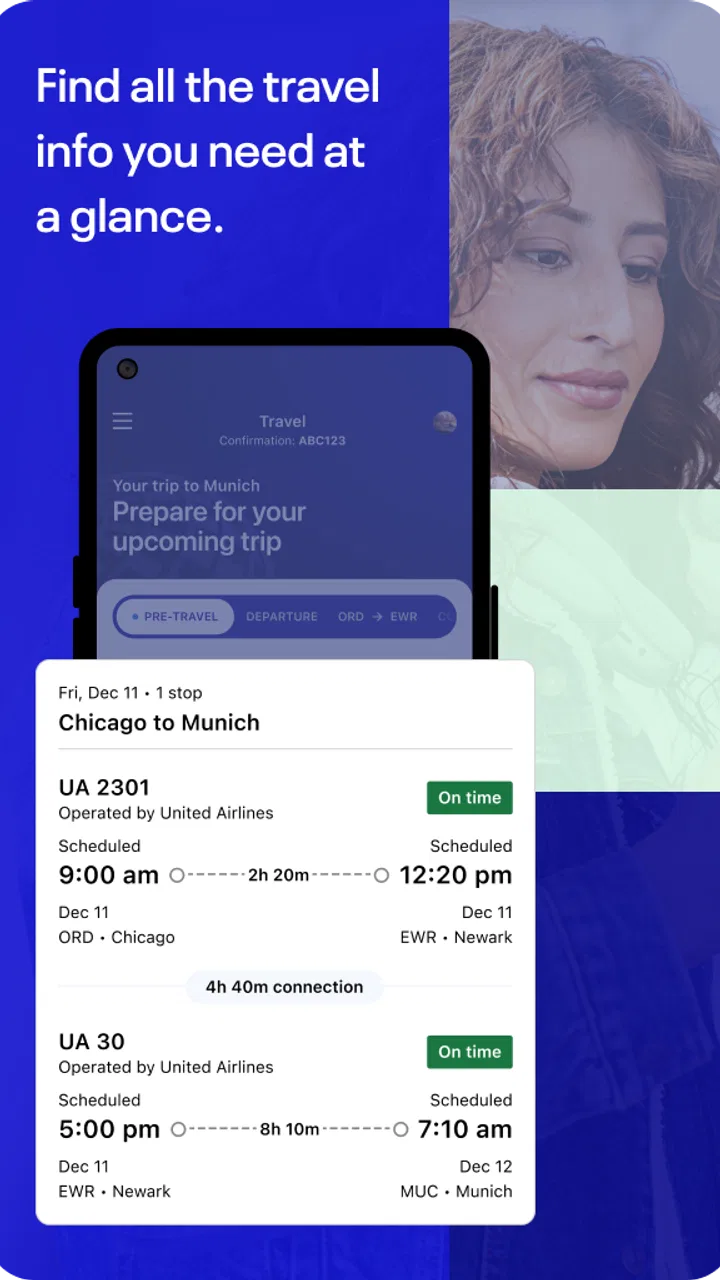
On a normal day, I found the central value of the United Airlines app easy to understand: it brings travel information into a single mobile workflow. Instead of switching between a booking email, a browser, and airport signage, I could use the app as the main reference point for the journey. That reduces mental effort, especially for travelers who prefer seeing the next step in one familiar place.
You May Also Like

 Blood Strike: 2.5 Anniversary
Blood Strike’s Loadouts Turn Every Drop Into a Tactical Gamble
A close look at Blood Strike’s custom loadouts: how fast access to signature weapons reshapes its battle royale rhythm, rewards preparation, and narrows the gap between fights.

 Pandora - Music & Podcasts
Pandora’s Music Is Easy to Start, but Harder to Recover
Pandora’s strength is its low-effort path from a seed to a station. Its weak spot is how much confidence it asks you to place in connection, setup, and quiet recovery.

 8 Ball Pool
 Is Built on Rivalries, Rematches, and Routine
A close look at the rivalries, rematches, shared routines, and unanswered safety questions that turn a quick pool match into a persistent mobile community.

 Samsung Music
’s Quiet Strength Is Playing What You Already Own
Its reach comes less from spectacle than from dependable access to a personal library. That simplicity is both the app’s strongest retention engine and its ceiling.

 AccuWeather: Weather Radar
AccuWeather Review: A Quick, Clear Forecast for Everyday Decisions
For everyday plans, the best forecast is the one you can understand quickly. AccuWeather makes rain timing, radar, and local conditions easy to act on, with a few trade-offs.

 Hill Climb Racing
Why Hill Climb Racing Still Turns Crashes Into One More Run
A tiny car, a bumpy hill and one more upgrade: Hill Climb Racing keeps resurfacing because its simple chaos makes every near-miss feel personal.
More From Our News Desk
View All News


The interface is most useful when I approach it with a specific question. Am I checking the current state of a flight? Looking for the details of a reservation? Trying to confirm what I need before leaving for the airport? This task-based approach makes the app feel less overwhelming than browsing through every available area. I recommend opening it before travel, while you have time to explore, rather than waiting until you are standing in a crowded terminal.
Readability is not only about the size of letters. It is also about whether information is grouped in a sensible order and whether the screen gives enough visual priority to what matters now. Travel apps can become difficult when every detail competes for attention. United’s app is strongest when it helps me focus on the immediate journey rather than forcing me to interpret a dense collection of airline language.
There is a useful habit here for people who process information slowly or become anxious when plans change: check the app at deliberate moments instead of repeatedly refreshing it. Before leaving home, review the trip. At the airport, check again after reaching the relevant area. If something changes, pause and read the complete update rather than reacting to the first prominent word on the screen. This is a small workflow, but it prevents the app from becoming another source of rushed decisions.
Navigation that helps, and navigation that still takes practice
I would not describe the app as a replacement for learning the airport itself. It can put airline information within reach, but it cannot remove the complexity of a large terminal, a tight connection, or a confusing boarding area. The app therefore works best as one layer of guidance. I still treat airport signs and staff as important sources of confirmation, particularly when I am tired or unfamiliar with the location.
New users may need a short orientation period. Airline apps often combine trip management, flight information, account-related areas, and travel extras, and that can make the first session feel busier than expected. Someone who rarely flies should explore the app with a calm trip in front of them. A person assisting an older relative can also walk through the important screens together before the travel day, so the traveler is not learning the layout while under pressure.
The app’s broad audience is reflected in its Everyone age rating, but that does not mean every screen will feel equally comfortable for every person. A teenager, a frequent business traveler, and someone taking a first flight may all need different levels of explanation. I appreciate the app most when I use it as a focused tool, not as a place to investigate every possible airline option.
Reading and visual attention during a busy journey
For travelers with reduced vision, glare, fatigue, or difficulty distinguishing small details, the most important preparation is to avoid relying on the phone alone. Increase the device’s text size if that makes reading easier, keep the screen clean, and use a comfortable brightness level before entering a bright terminal. These are device-level adjustments rather than special claims about the app, but they can make the difference between calmly checking a detail and repeatedly squinting at the display.
I also recommend taking a moment to identify the key information before scrolling. Flight-related screens can contain several kinds of detail, and a quick glance may not be enough when the phone is held at an awkward angle. If you have difficulty reading while walking, stop in a safe place, enlarge what you need, and complete the task before moving again. That sounds obvious, yet it is one of the most practical accessibility choices a traveler can make.
People who are color-sensitive should be cautious about interpreting status through color alone. I would read the accompanying text rather than assuming that a particular shade carries the whole meaning. Likewise, travelers with attention-related difficulties may benefit from writing down the one or two details they need before opening the app. A short note such as the flight identifier or destination can make searching less mentally demanding.
Touch, hearing, and hands-busy situations
Mobile travel tasks can be physically awkward even when the software is clear. You may be holding a passport, pulling a suitcase, wearing gloves, or trying to use the phone with one hand. I found that the app is easier to use when I prepare before reaching the busiest part of the airport. Open the relevant travel information while seated, and avoid making a complicated change while standing in a security line or boarding queue.
For users with limited dexterity or tremors, the best approach is to slow down and avoid tapping repeatedly when a screen seems delayed. Repeated taps can create unintended actions or simply increase frustration. A stable grip, a moment of rest, and the device’s own touch settings may help. If another person is traveling with you, agreeing in advance on who will handle the phone can also reduce pressure without taking control away from the traveler.
Hearing differences deserve a separate consideration. I would not depend on an audio announcement or a phone alert as the only way to understand a change. Keep checking the written information in the app and confirm important updates through visible airport displays or staff when necessary. This layered approach is safer for anyone in a noisy terminal, not only for people with hearing loss.
Travelers who are sensitive to visual motion, crowded layouts, or constant notifications may prefer to use the app in short sessions. Open it for a defined purpose, read the relevant information, and close it. The app is more manageable when it supports a planned action instead of becoming a stream of interruptions during an already demanding journey.
Using it when circumstances are less than ideal
When I’m traveling under less-than-ideal conditions, I try to make the app one part of a simple backup plan rather than the whole plan. I keep the next important detail easy to find and decide in advance where I’ll pause to check it, which is especially useful when I’m tired or juggling bags. From there, the practical question is how that habit holds up during an ordinary airport journey.
A realistic airport scenario
Imagine that I am traveling early in the morning with a small bag, a phone battery that I want to conserve, and a connection at an airport I do not know well. Before leaving home, I would open the United app and make sure I understand the trip details. At the terminal, I would check the current information before entering a crowded area, then put the phone away while walking. After reaching a quieter spot, I would review it again rather than trying to read while navigating people and signs.
If the plan changes, the app can be a useful first reference, but I would not treat the screen as the only authority. I would compare the written information with airport displays and ask United staff when the consequence is important, such as a missed connection or a gate that is difficult to locate. This is especially valuable for travelers who need extra time to move, communicate, or process new instructions.
For a person with memory difficulties, a companion could help establish a simple routine: check the app at agreed points, repeat the destination aloud, and keep essential travel documents together. For someone who becomes overwhelmed by too much information, the companion should explain only the immediate next step. The app can support that routine, but it cannot replace a human plan tailored to the traveler.
Connectivity, battery, and backup planning
A common mistake is assuming that a travel app eliminates the need for preparation. I would keep important reservation details available in another form as well, whether that means an email, a note, or information shared with a companion. The reason is not that the app is unhelpful; it is that phones can lose power, networks can become unreliable, or a traveler may be unable to use the screen comfortably at a critical moment.
Battery management is also part of accessibility. Someone who uses a phone heavily for magnification, communication, translation, navigation, or medical coordination may have less battery available for the airline app. A portable charger and a habit of closing the app after checking the needed information can preserve that resource. This matters particularly for travelers who cannot easily ask others to read signs or explain announcements.
People with communication disabilities may find written travel information easier to show to a companion or staff member than explaining everything verbally in a noisy environment. I would use the app as a reference to support that interaction, while still asking an employee to confirm anything unclear. Showing a screen can reduce the need to repeat a complicated itinerary, but it does not guarantee that every airport process will be visible there.
Where the app fits beside other travel tools
Compared with a general travel planner, the United app has a clear advantage when the journey involves United: it keeps the airline-specific side of the trip closer to the source. A general app may be better for comparing multiple airlines, organizing hotels, or building a complete vacation itinerary. If I am still deciding how to travel, I would not use the United app as my only research tool.
Compared with a mobile browser, the dedicated app feels more appropriate for repeated travel checks. A browser is useful when I am on a shared device, do not want another app installed, or need to compare information across different airlines. The app makes more sense when I expect to revisit the same trip during the journey and want a consistent place to start.
Compared with airport screens, the phone offers a more personal way to review information and can be easier for someone who cannot see a distant display. Airport screens, however, remain valuable because they are shared, visible to companions, and independent of an individual phone’s battery or connection. I see the strongest setup as a combination: use the app for personal reference, then confirm major changes through the airport environment or staff.
Who will appreciate it, and who should skip it
I would recommend the app to United passengers who want a central travel reference, especially people who prefer written information and like preparing their next step in advance. It is also useful for companions helping someone else travel, because both people can work from the same airline-specific details instead of relying entirely on memory.
It is less suitable as a primary tool for someone comparing airlines, managing a trip built around several carriers, or avoiding smartphone dependence altogether. A traveler who dislikes app-based planning may be happier with printed documents, direct assistance, and a browser used only when necessary. Likewise, anyone who finds small-screen reading, touch interaction, or changing digital information exhausting should create a backup routine rather than depending on the app by itself.
The app’s average rating is 4.7 from roughly 904 thousand ratings, with about 40 thousand written reviews. That level of response indicates strong everyday appeal, but it does not settle the accessibility question for a particular user. A highly rated airline app can still be uncomfortable for someone with specific visual, motor, cognitive, or sensory needs. My advice is to test the basic workflow before travel: open the trip, find the information you expect to need, and decide whether the text and navigation feel manageable on your own device.
My inclusive verdict
The best way to use United Airlines is as a prepared, personal reference rather than your only source of travel support. I like that it brings airline information into a familiar mobile setting, and I find that especially helpful when I want to check details privately or avoid searching through several messages. Its free price removes a financial barrier, and the Everyone rating makes it a reasonable option for a wide range of travelers.
Its limitations are mostly practical rather than dramatic. A phone can be hard to read in glare, awkward to operate with one hand, difficult to hear around, and useless when its battery or connection fails. The app also cannot make every airport physically accessible or replace clear assistance from staff. Those realities are important for disabled travelers, older passengers, people with limited digital confidence, and anyone traveling under stress.
My final recommendation is straightforward: install it if United is part of your trip, explore it before departure, adjust your phone for comfortable reading, and keep a second way to access essential details. Used that way, the app can reduce unnecessary searching and give you more control over the journey. I would choose it confidently for United-focused travel, but I would pair it with airport signage, human assistance, and a backup plan whenever a traveler’s safety or independence depends on more than one screen.
FAQs for United Airlines
01What features does the United Airlines app offer?
The United Airlines app is packed with features to enhance your travel experience. You can book flights, check in, and access mobile boarding passes. Additionally, the app provides real-time flight status updates, airport maps, and even lets you track your baggage. MileagePlus members can also access their accounts to manage points and view benefits.
02Is the United Airlines app available for both Android and iOS devices?
Yes, the United Airlines app is available for both Android and iOS platforms. You can download it from the Google Play Store for Android devices and the Apple App Store for iOS devices. The app is designed to be user-friendly and provides a seamless experience across both operating systems.
03Can I use the United Airlines app for international travel?
Absolutely, the United Airlines app supports both domestic and international travel. You can book international flights, check in for flights departing from various countries, and access destination-specific travel requirements. The app also provides necessary updates and notifications for international travel, ensuring you’re well-prepared for your journey.
04How secure is the United Airlines app for booking and managing flights?
The United Airlines app employs robust security measures to protect your personal and payment information. It uses encryption and secure protocols to ensure that your data is safe during transactions. Regular updates and security patches further enhance the app’s security, making it a reliable tool for booking and managing flights.
05What should I do if I encounter issues with the United Airlines app?
If you experience any issues with the United Airlines app, there are several ways to resolve them. First, check for app updates and ensure you have the latest version. If the problem persists, you can contact United Airlines customer support via phone or through the app itself for assistance. Additionally, the app’s FAQ section may provide solutions to common problems.
Pros
- Easy-to-use interface for booking flights.
- Access to exclusive flight deals and promotions.
- Real-time flight status updates.
- Comprehensive MileagePlus rewards integration.
- In-app customer service chat support.
Cons
- Occasional app crashes during peak times.
- Limited offline functionality.
- Seat selection may incur extra fees.
- Frequent login prompts can be annoying.
- Some features require Wi-Fi or data.

United Airlines
Gallery